

Best Email Scripts for Photo Booth Bookings
Every email you send to a potential client is an opportunity to secure a booking. But crafting emails from scratch can be time-consuming and inconsistent. Pre-written templates solve this problem by saving time, maintaining professionalism, and increasing your chances of converting inquiries into bookings.
Here’s why they work:
- Faster responses: Automated emails ensure you reply promptly, which can double your chances of securing a booking.
- Higher conversions: Personalization, clear details, and follow-ups can boost response rates from 40% to 98%.
- Time savings: Business owners like Sarah M. save up to 8 hours weekly by using templates.
This guide includes scripts for every stage of the photo booth booking process – from the first inquiry to post-event follow-ups. Whether you’re confirming a booking, reminding clients about payments, or thanking them after an event, these templates will streamline your communication and help you book more events.
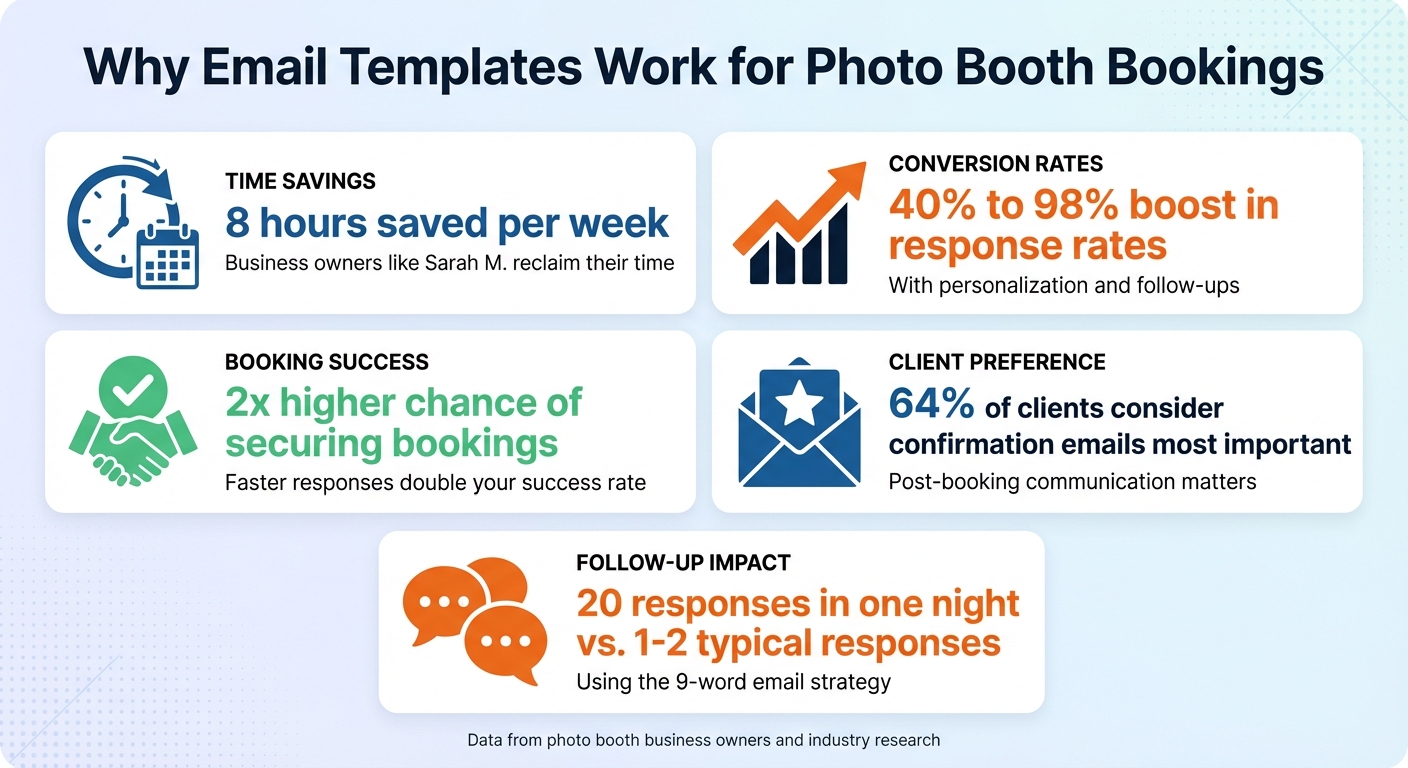
Email Template Benefits for Photo Booth Bookings: Key Statistics
The 7 Emails Every Photo Booth Entrepreneur Needs
Mastering these templates is one of the key business growth secrets for scaling your rental operations.
sbb-itb-388abf8
1. Initial Inquiry Response Email
Responding quickly can make all the difference in securing bookings. Sending an automated acknowledgment email immediately after receiving an inquiry reassures potential clients that their request has been received and sets expectations for when they’ll get a detailed response.
A personalized and timely reply can set the stage for a smooth client experience. Start with an eye-catching subject line that includes the client’s name, such as "Jennifer – Your Photo Booth Inquiry". This approach not only grabs attention but also taps into a psychological principle. As Photo Booth Training explains:
"People respond well to seeing their own name. Usually, regardless of the volume of the noise, if someone calls out your name, you can hear it. We are programmed to respond to seeing and hearing our names be called".
When replying, reference specific details from their inquiry. For instance, if they mention a venue you’ve worked at before, highlight it:
"I loved working at [Venue Name] last week".
This small touch shows you’re paying attention and not just sending a cookie-cutter response.
Make sure to include key information upfront – package options with pricing, technical requirements, and a direct booking link. Don’t make potential clients dig for details. Adding social proof, like links to event galleries or how to get more customer reviews, can also help build trust right from the start.
Create a sense of urgency in a friendly way by mentioning availability, such as, "Only one photo booth available for [Date]." Follow up with a quick text to keep the communication flowing: "Hi [Name], I just sent over the requested info. Let me know if you have any questions!".
2. Booking Confirmation Email
Once you’ve captured a client’s interest and secured their booking, the next step is sending a solid booking confirmation email. This email isn’t just a formality – it’s your chance to clarify details, set expectations, and reassure your client that they’ve made the right choice.
Studies reveal that 64% of clients consider confirmation emails the most important message they receive after booking. So, don’t treat this like a simple receipt. Use it to remove any doubts, provide clear information, and strengthen your connection with the client. This is a key part of your business growth strategies.
Timing and Subject Line
Send the confirmation email immediately after payment. A personalized and concise subject line works best. Something like, "[Client Name] – Your Photo Booth Booking Confirmation" is a great reminder that this is their booking. Since 70% of emails are opened on mobile devices, keep the subject line short (around 5–7 words) and include easy-to-click buttons like "Add to Calendar".
What to Include
Make sure your email covers all the essentials:
- Event Details: Clearly outline the date, start and end times, and the venue. Adding a Google Maps link for the venue is a thoughtful touch.
- Package Information: List what’s included in their booking, like the photo booth model, service duration, and any extras (custom backdrops, props, etc.).
- Financial Breakdown: Show transparency by breaking down the total cost, deposit paid, and remaining balance.
- Contact Information: Provide multiple ways for them to reach you – phone, email, or even WhatsApp – for any last-minute questions or day-of coordination.
Multi-Channel Follow-Up
To ensure everything is clear, follow up with a quick text message:
"Hi [Client Name], [Your Name] from [Business Name] here. Please review your booking confirmation and let me know if you have any questions."
This extra step not only reinforces the booking but also gives your client an easy way to address any lingering concerns. It’s all about making their experience smooth and stress-free.
3. Follow-Up Email for Pending Inquiries
Not every inquiry leads to an immediate booking, but a well-timed follow-up email can often turn things around.
Timing is everything. Aim to follow up 24–48 hours after sending the initial proposal, then again a few days later, and once more about a week later. After three attempts, it’s best to archive the lead and shift your focus to more promising prospects. One photo booth business owner shared that using automated follow-up sequences boosted their follow-up rate from 40% to an impressive 98%. This structured approach ensures your follow-ups remain timely and effective.
Keep it short and conversational. Sometimes, less is more. The "9-word email" strategy has become a game-changer for re-engaging quiet leads. For example, photo booth owner Kari sent out a simple email: "Are you still looking to rent a photo booth?" – no signature, no links. The result? 20 responses in one night, compared to the usual 1–2 from traditional mass emails.
"This email works because it is very conversational, demands a response and creates curiosity. This email will get your silent customers jumping off the fence and giving you an answer." – Kari, Photo Booth Business Owner
Create urgency. Highlight limited availability or set a deadline to encourage action. For instance, you could mention there’s "only one booth left for their date" or provide a specific deadline for your proposal. To make it easy for them, include a direct link to your pricing guide and reference details from their original inquiry. For added visibility, follow up with a quick text, such as "Hi [Name], just sent that email", to ensure they see it.
4. Schedule Change or Cancellation Email
Things don’t always go as planned – equipment might sell out, schedules may shift, or clients could need to reschedule. How you handle these changes can shape your professional reputation, so it’s essential to communicate adjustments clearly and effectively.
Be clear and specific. Start your email with key details like the Booking ID, event date, and venue name to avoid any misunderstandings. If you need to cancel a proposal due to unavailable equipment, be upfront. Ryan Salinas, an expert in the photo booth business, highlights the importance of this approach:
"Notify clients when a proposal is no longer available or an event is sold out. Sometimes you sell out of equipment, but how do you notify your client in a respectful way?"
Clarity and transparency are crucial in maintaining trust and professionalism.
Make it easy to act. Just like with booking confirmations, ensure any schedule adjustments are precise. Clearly outline the new arrival time, setup duration (usually about an hour), and departure time. Include a direct link to the client portal so they can review the changes immediately. If you’re sending a revised proposal, adding an expiration date can encourage timely decisions. Whenever possible, prioritize rescheduling to retain both revenue and client goodwill.
Leave the door open. Even when delivering less-than-ideal news, keep your tone respectful and professional. If you’re fully booked, let the client know you’d be happy to assist with future events or suggest alternative dates if available. Keeping the conversation open can pave the way for future opportunities.
5. Pre-Event Reminder Email
A reminder email sent 48 hours before the event can help ensure everything runs smoothly and reduce the chances of no-shows. Keep the subject line short – under 60 characters – and personalize it with the client’s or event name. This email should focus on delivering clear, actionable details to keep everyone on the same page.
Stick to the essentials. Use the email to confirm the event date, venue address, setup arrival time (usually an hour before the photo booth starts), the expected end time, and any technical needs like access to power outlets, sufficient space, or Wi-Fi credentials. Having the best photo booth software can also help manage these technical requirements seamlessly. Additionally, confirm or request the name and phone number of the on-site contact for last-minute coordination. To make it easy for clients to double-check details, include a direct link to the client portal.
Make it easy to skim. Keep the email under 200 words with short, clear sentences. This format makes it simple for clients to find the key information they need without wading through unnecessary details. A skimmable email helps ensure everyone is well-prepared for the big day.
Add a personal touch. Address the client by name in both the subject line and body to create a more engaging message. If you’ve worked at the venue before, mention something specific about the setup to build trust. Including a brief FAQ as an attachment can also cut down on follow-up questions. Balancing personalization with automation lets you maintain quality while saving time.
Automate for consistency. Use your CRM to schedule automated reminders, ensuring no event slips through the cracks. To reinforce the email, follow up with a quick text message to confirm receipt and answer any immediate questions.
6. Payment Request Email
The goal of a payment request email is to make the payment process as simple and hassle-free as possible for your client. The easier it is, the quicker they’ll secure their date.
Establish a clear follow-up schedule. Don’t wait until the payment is overdue to reach out. Set up reminders at key intervals: one week before the due date, on the due date itself, and again at one, two, and four weeks if the payment hasn’t been made yet. A consistent follow-up schedule shows professionalism when starting your business and keeps clients informed without catching them off guard with sudden overdue notices.
Include all necessary details. Make sure your email covers everything the client needs to know: the original due date, the remaining balance, accepted payment methods, and step-by-step instructions for completing the payment. Always attach or link the invoice to save them the trouble of digging through old emails. This clarity ensures there’s no confusion about how to proceed.
Add a personal touch and a sense of urgency. Address the client by name and mention something like "only one photo booth is available" for their date to encourage prompt action. This approach, combined with using multiple channels of communication, can boost the chances of a quick response.
Keep it straightforward and focused. Avoid cluttering the email with unnecessary signatures, links, or contact details. Keep the focus on the call to action. Using "RE:" in the subject line can also help grab attention, especially for leads that have gone quiet.
7. Post-Event Thank You and Upsell Email
Wrapping up your event with a thoughtful post-event email is a great way to strengthen client relationships and set the stage for future opportunities. Sending this email the morning after an evening event keeps the experience fresh in your client’s mind.
Start with gratitude and make it personal. Address the client by name, mention a memorable detail from their event, and include a direct link to their event gallery. This way, guests can easily revisit and share their favorite moments. This personalized touch not only shows your appreciation but also opens the door for feedback and potential future bookings.
Focus on feedback before introducing upsells. Encourage your client to leave a review or complete a quick survey, and consider offering a small incentive for their time. Once they’ve engaged with you, it’s a natural transition to suggest booking another event or exploring tips for buying your first photo booth to expand your services.
To grab attention, craft subject lines that feel personal. Using the client’s name and words like "Your" can make your email stand out in a crowded inbox (e.g., "Sarah – Your Photo Booth Gallery"). Keep the email design clean, mobile-friendly, and professional. Don’t forget to include a polished signature with clear contact details.
Automate to ensure consistency. Tools like Lead Fuel CRM (priced at $97/month) can help you set up automated thank-you email sequences, ensuring no client is overlooked during busy event seasons.
Conclusion
The email scripts shared above highlight how simplifying your communication can save time and lead to more bookings. Pre-written templates not only cut down on administrative work but also eliminate the struggle of figuring out what to write. This gives you more time to focus on running your photo booth business effectively. Plus, they ensure your communication remains professional and consistent, from the first inquiry to the final follow-up.
These tools aren’t just time-savers – they’re also powerful for boosting conversions. By turning inquiries into confirmed bookings, they help your business grow. As Ryan Salinas, a consultant for photo booth businesses, puts it:
"Save precious time by using ready-made, professionally crafted email templates that cover every stage of client interaction, from initial outreach to post-event follow-ups".
To make these templates even more effective, personalize them. Including specific details like the client’s name, venue, or a shared connection can make your emails stand out. For example, a subject line like "Jennifer – Your Photo Booth Inquiry" can grab attention and improve open rates.
If you’re ready to take things a step further, consider tools like Photo Booth International’s Lead Fuel CRM. At $97 per month, it simplifies communication and booking management by combining email automation, client management, and 24/7 AI chatbot support. Sarah M., a photo booth business owner, shared her experience:
"I got 8 hours of my life back every week. I was spending half my day switching between HoneyBook, MailChimp, and my calendar. Lead Fuel put everything in one place".
FAQs
How can I make my email templates more personalized for photo booth bookings?
To add a personal touch to your email templates, start by using the recipient’s name in both the subject line and the email body. This simple effort makes your message feel more direct and engaging. Reference specific details they’ve shared, like the type of event, the venue, or their preferences. These little nods to their situation show you’re paying attention and help build a stronger connection.
You can also include practical tips or suggestions tailored to their event. For example, offer photo booth setup ideas for weddings or branding options for corporate gatherings. If you segment your email list by customer type, you can send messages that align closely with their interests. Even when using pre-made templates, leave room for personalization so every email feels thoughtful and tailored to the individual.
What should I include in a photo booth booking confirmation email?
A well-written booking confirmation email should cover all the important details to keep things crystal clear for both you and your client. Begin with the basics: include the event date, time, location, and the specific services or package they’ve chosen. This ensures everyone is on the same page and helps avoid confusion.
You might also want to add logistical information, like setup times, access instructions, or any specific requirements for the event venue. Including a personal touch – like addressing the client by name or referencing their event – can make the email feel more tailored and professional.
Don’t forget to provide contact details in case they have follow-up questions. If necessary, add a call to action, such as asking them to confirm receipt or complete payment. A clear and friendly email like this sets the stage for a smooth event planning process.
How can automated follow-up emails help increase photo booth bookings?
Automated follow-up emails are a game-changer when it comes to increasing photo booth bookings. They ensure quick, professional responses to potential clients, making it easier to provide clear information about your services and keep the conversation flowing. This kind of timely communication builds trust and strengthens connections with your audience.
When you personalize these emails and include reminders or updates, it shows clients that their interest matters to you. This thoughtful approach not only helps turn inquiries into confirmed bookings but also keeps your business fresh in their minds, boosting the likelihood of securing a reservation.

